

A clear specification list can make a local gaming PC sale more predictable than a quick estimate based on appearance alone. If you’re searching “sell gaming pc for cash cincinnati,” you’re likely asking two practical questions: where to start and what to prepare before an evaluation.
It’s reasonable to want to know whether your desktop may qualify for buyback, which components matter, and how to protect your files and accounts. Phones4cash offers computer buyback in Cincinnati, but confirm whether it evaluates gaming desktops and how its evaluation is arranged before you visit. An evaluation doesn’t guarantee a purchase or a particular offer.
This guide explains how to record your PC’s processor, graphics card, memory, storage, and condition so you can provide accurate information. You’ll also learn what may affect an evaluation, how to back up and wipe your data, and what to clarify about a local transaction. With the key details ready, you can approach the process with realistic expectations and fewer unanswered questions.
Key Takeaways
- Compare local buyback, private sales, and trade-ins by the effort and coordination each requires. Don’t assume one route guarantees a better result.
- List your PC’s key components and describe its condition accurately. Specifications help explain the system but don’t guarantee a higher offer.
- Prepare in order: verify the configuration, back up files before any reset or wipe, remove accounts, and document the PC’s condition.
- To sell gaming pc for cash cincinnati, ask Phones4cash whether it evaluates gaming desktops, then confirm the evaluation process and payment details before visiting. Its stated service area includes Cincinnati, Mason, West Chester, and Fairfield.
Sell gaming pc for cash cincinnati: What to Expect
A gaming PC’s appearance alone doesn’t tell a buyer what it can do. The processor, graphics card, memory, storage, operating condition, and overall configuration help describe the system being considered. If you’re searching “sell gaming pc for cash cincinnati,” expect an evaluation based on the particular computer, not a guaranteed offer based on the word “gaming.”
Buyback eligibility depends on the device and the buyer’s evaluation process. Phones4cash buys computers, but its information doesn’t confirm that every gaming desktop is eligible. Contact the business before visiting to ask whether it will evaluate your PC and to clarify where and how the evaluation takes place. An inquiry helps you confirm next steps, but it isn’t a promise that the computer will be accepted or purchased.
What counts as a gaming PC for a buyback inquiry?
A desktop gaming PC is commonly identified by a dedicated graphics card and components selected for gaming performance. For background on what defines a gaming PC, consider how its hardware differs from a standard computer. That description isn’t a buyback requirement. Tell the buyer whether you have a desktop tower, a gaming laptop, or separate components, since these may follow different intake and evaluation rules.
Be specific about what you want assessed. A complete desktop is not the same item as a laptop or a loose graphics card. Sharing the device type and available configuration details helps the buyer respond to the right question. No individual component automatically qualifies a system for buyback.
Which nearby sellers should confirm local service details?
Cincinnati sellers can ask Phones4cash about computer buyback and whether a gaming desktop can be evaluated. The business also serves nearby communities including Mason, West Chester, and Fairfield. Before travelling from any of these locations, confirm where the evaluation takes place, how it works, and whether you should contact the business first. Don’t assume the service area means there are multiple evaluation sites.
For more information about the computer-focused service, see the Cincinnati computer buyback guide. Use it as background, then verify gaming desktop eligibility and current arrangements directly before making travel plans.
Keep expectations conditional. A clear description helps the buyer determine whether to proceed with an evaluation, but the outcome and any offer depend on the specific system and its condition. Confirming the basics first can help you avoid an unnecessary trip and understand the next step before bringing in a computer.
Which Gaming PC Specs and Condition Details Affect an Evaluation?
A useful evaluation starts with a clear account of what the PC contains and how it works. Verifiable specifications, along with a separate description of wear, faults, and included items, help a buyer understand exactly what you’re presenting. These details inform an evaluation, but no single component guarantees eligibility or a particular offer.
Which components should you identify before asking about a sale?
Record the processor, graphics card, installed memory, storage type and capacity, and operating system, if known. Check Windows System Information or the manufacturer’s documentation rather than guessing at model numbers. If you can access the PC, system screens may help verify details. Photograph labels or screens for reference, but keep personal information, account names, serial numbers, and other sensitive details out of images you share.
- Processor and graphics card: Note the model names shown in system tools or documentation.
- Memory and storage: Record the installed memory and the type or capacity of each drive, where available.
- Operating system: Identify the version if you can confirm it.
How should you describe wear, faults, and included parts?
Separate cosmetic condition from performance issues. Scratches, dust, or a missing case panel describe physical wear. A PC that fails to boot, loses its display, overheats, or behaves unstably has a functional concern to disclose. Mention damaged ports, unusual noises, and other known faults directly. If you haven’t tested a feature, say so rather than presenting it as working.
List power cables and accessories separately, such as a keyboard or mouse, if they’re included. Don’t assume an accessory changes eligibility or the evaluation. Accurate notes reduce avoidable confusion when the system is reviewed.
Example: “Desktop with [processor], [graphics card], [memory], and [storage]; boots and displays an image, but has a damaged front USB port; includes the power cable.” Replace the brackets with verified details and adjust the condition notes to match your PC.
Before handing over any computer, protect your personal files and accounts. Dell’s guidance on securely wiping a hard drive can help you review data-removal steps. Back up files before attempting a reset or wipe.
If you’re preparing to sell gaming pc for cash cincinnati, use your specification and condition notes to ask Phones4cash about computer buyback. Confirm whether it can evaluate your gaming desktop and what information it needs before making plans.
Local Buyback, Private Sale, or Trade-In: Which Route Fits?
The right route depends on how much work you want to take on and what the buyer or retailer will evaluate. With a local buyback, you ask a business to assess your computer. For a private sale, you handle the listing, buyer questions, and handoff. A trade-in follows a retailer’s own eligibility rules and terms, which may differ from a cash sale. None guarantees a particular offer or outcome.
| Route | Evaluation | Seller effort | Transaction coordination | Offer certainty |
|---|---|---|---|---|
| Local electronics buyback | The business assesses the system under its evaluation process. Ask what specifications or condition details it needs. | Prepare accurate device information and confirm eligibility and evaluation arrangements. | Confirm where and how the evaluation takes place, plus payment terms, before proceeding. | Depends on the specific PC and evaluation. Confirm whether an initial estimate can change after inspection. |
| Private-party sale | Interested buyers judge your listing, specifications, photos, and answers to questions. | Create the listing, respond to inquiries, and arrange a safe exchange. | You coordinate directly with the buyer, including the meeting and payment details. | Depends on buyer interest and agreement. A listing or inquiry isn’t a completed sale. |
| Retailer trade-in | The retailer checks the device against its current trade-in criteria. | Review eligibility, prepare the computer, and follow the retailer’s stated process. | Follow that provider’s instructions and clarify whether its offer is cash, credit, or another form of value. | Subject to the retailer’s terms and assessment. Confirm them before committing. |
What should you compare before choosing a selling method?
Consider the work involved, not just the first estimate. If you prefer not to create a listing or manage buyer messages, ask a local buyback business how it evaluates computers and what details to send first. Phones4cash offers computer buyback, but confirm whether it currently evaluates gaming PCs and clarify the process before visiting.
A private sale puts more coordination in your hands. You’ll communicate directly, agree on the terms, and plan a safe handoff. If selling privately, protect your files before transferring the computer. Engadget explains steps to securely wipe your data.
How can you assess an offer without assuming a market price?
Compare evaluations based on the same processor, graphics card, memory, storage, included items, and disclosed condition. Ask whether an early estimate is conditional and whether an in-person inspection may change it. Comparing like with like makes differences easier to understand without treating an estimate as a guaranteed payout.
For a local starting point, ask Phones4cash about computer buyback, including gaming desktop eligibility, evaluation arrangements, and payment terms.
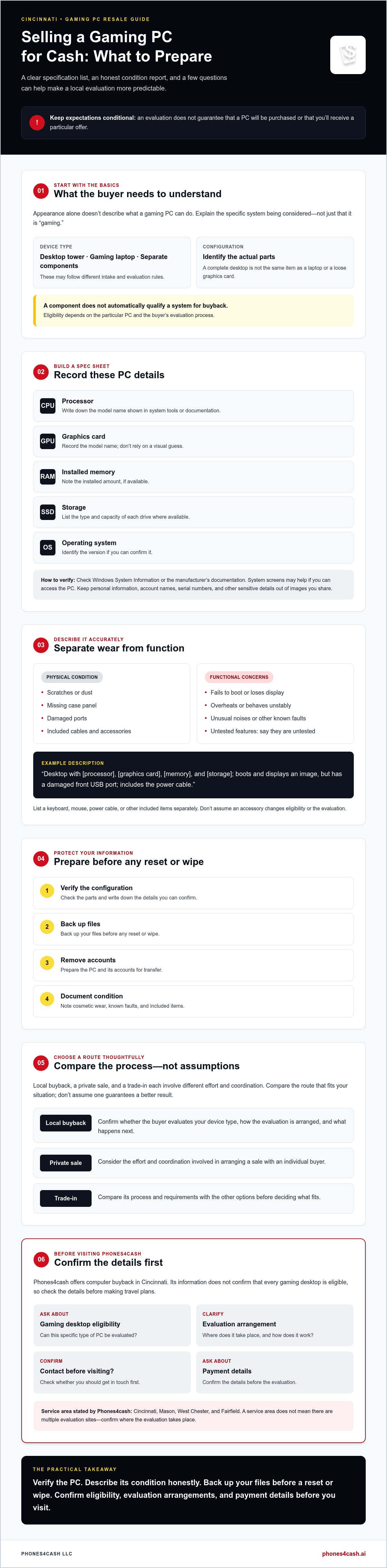
How to Prepare a Gaming PC Before Selling It for Cash
A short preparation routine can make an evaluation easier and help protect your personal information. Follow the steps in order. Don’t reset the PC or erase a drive until you’ve secured any files you want to keep.
- Verify the specifications. Check the component details you recorded against system information or manufacturer documentation. Note anything you can’t confirm instead of guessing.
- Back up important files. Copy wanted documents, photos, and other data to a separate storage location. Open a few files from the backup to confirm they’re accessible before removing local copies.
- Sign out and remove personal access. Log out of personal accounts and remove saved credentials where appropriate. Review apps or services that may keep you signed in.
- Document condition. Record known faults and photograph the exterior, including existing damage. Note which cables or accessories are included.
How do you protect your files and accounts?
Data removal isn’t identical for every setup. The right method depends on the storage device and operating system, so don’t assume a reset guarantees complete erasure. Back up first, then review the manufacturer’s guidance for your device. If you’re uncertain how to wipe a drive securely, get informed help before handing over the PC or its storage device.
Ask the buyer how personal data and installed storage are handled during evaluation. Clarify whether the drive stays in the computer and what you should do before bringing it in. That answer helps you prepare without risking files you still need.
What should you bring or document for evaluation?
Keep a concise record of the verified configuration, known faults, included components, and any purchase documentation you still have. Photograph the case from several angles and note scratches, dents, or missing panels before a handoff. Bring only accessories the buyer requests or confirms are useful. Don’t assume cables, peripherals, or paperwork are required for an evaluation.
If you plan to sell gaming pc for cash cincinnati, confirm the gaming desktop is eligible before travelling. Phones4cash buys computers, but gaming PC acceptance and the evaluation process should be verified directly. Ask what information to provide and how installed storage is handled before making arrangements.
Ask Phones4cash about gaming PC evaluation and confirm the next steps before your visit.
How to Ask Phones4cash About Selling a Gaming PC in Cincinnati
Phones4cash buys computers through an evaluation process, but gaming desktop eligibility isn’t confirmed for every system. Before travelling, use a brief contact sequence to find out whether your PC can be considered and what steps to expect. This applies to sellers in Cincinnati and nearby communities such as Mason, West Chester, and Fairfield. These are service areas, not confirmation of multiple storefronts.
What information should you provide when you contact a buyer?
Start by identifying the device as a desktop gaming PC, not a laptop or a group of loose components. Share the specifications you’ve verified, including the processor, graphics card, memory, and storage. Then describe whether it boots and displays an image, along with any known faults or missing parts.
Be clear about data status, too. Say whether the computer has been reset or still contains personal files, and ask how installed storage is handled during evaluation. Then ask whether Phones4cash currently evaluates gaming desktops and what information or steps it needs next. Clear details help the business respond to the specific system you’re asking about.
What should you confirm before travelling?
Before making plans, confirm the evaluation location and process, whether you should contact the business beforehand, and what opening arrangements apply. Ask how an offer is determined and whether an initial estimate may change after the computer is inspected. Also clarify the payment method and any transaction terms directly. Don’t assume a visit guarantees acceptance, an offer, or a completed sale.
Keep the exchange straightforward: share your configuration and condition notes, get answers to practical questions, then decide whether to proceed. If the evaluation location or next step isn’t clear, resolve that before transporting a desktop. For wider context on preparing and comparing options, read this guide to selling electronics for cash.
If you’re looking to sell gaming pc for cash cincinnati, contact Phones4cash to confirm gaming desktop eligibility, evaluation arrangements, and payment details before you visit.
Contact Phones4cash about your gaming PC
Take the Next Step With a Clear Plan
A more predictable sale starts with accurate information. Document your PC’s configuration and condition, protect your personal files before resetting or wiping storage, and compare selling routes by the effort and coordination involved.
If you want to sell gaming pc for cash cincinnati, confirm that a gaming desktop is eligible before making travel plans. Phones4cash offers computer buyback and describes an evaluation process for pre-owned electronics, but the PC’s acceptance and any offer depend on its specific evaluation. Ask about the evaluation location, payment method, and visit requirements in advance so you know what to expect.
Have your specifications and known issues ready, then use them to start a clear conversation. Contact Phones4cash about selling your gaming PC to ask about eligibility and next steps. With the details prepared and expectations clarified, you can decide whether the local buyback process fits your needs.
Frequently Asked Questions
Can I sell a gaming PC for cash in Cincinnati?
Yes, you can ask local buyers whether they’ll evaluate your gaming PC, but acceptance depends on the specific system and the buyer’s process. If you want to sell gaming pc for cash cincinnati, Phones4cash offers computer buyback, but confirm that gaming desktops are currently eligible before visiting. Sellers in Cincinnati and nearby Mason, West Chester, and Fairfield should also verify the evaluation location, process, and payment method before making plans.
How do I find out what my gaming PC is worth?
Start by documenting the processor, graphics card, memory, storage, operating system, and known condition issues. A buyer needs those details to understand the system being evaluated, but no component guarantees a particular offer. For a useful comparison, make sure each buyer is considering the same configuration, accessories, and faults. Ask whether an early estimate could change after an in-person inspection, and don’t treat an estimate as a guaranteed sale price.
What should I do before selling my gaming PC?
Verify the specifications, back up files you want to keep, sign out of personal accounts, and document the PC’s condition. Confirm that your backup opens before resetting the computer or wiping storage. Data-removal steps depend on the drive and operating system, so don’t assume a reset completely erases information. Ask the buyer how installed storage is handled during evaluation and disclose any faults or missing components before arranging a handoff.
Will a buyer accept a broken or incomplete gaming PC?
Possibly, but acceptance depends on the buyer’s criteria and the computer’s specific condition. Don’t assume a PC with a faulty port, missing panel, unstable performance, or absent component will qualify. Describe what works, what doesn’t, and what parts are missing when you inquire. Phones4cash buys computers, but gaming desktop eligibility and acceptance of incomplete systems should be confirmed directly before you travel or prepare the computer for evaluation.
Should I sell my gaming PC privately or to a local buyback business?
Choose based on the time and coordination you’re willing to handle. A private sale means creating a listing, answering questions, and arranging a safe handoff with a buyer. A local buyback inquiry lets you ask a business about its evaluation process, but eligibility and any offer depend on its assessment. Compare routes using the same PC specifications and condition details, and clarify payment and transaction terms before agreeing to proceed.
Can I sell my gaming PC if it still has my files on it?
You can ask a buyer about its process, but protect your data before handing over a computer or storage device. Back up files you want to keep, check that the backup works, sign out of accounts, and ask how installed drives are handled during evaluation. If you’re unsure how to erase data securely, get informed help first. Don’t rely on a basic reset as proof that personal information has been completely removed.
Do I need to bring accessories when selling a gaming PC?
Not necessarily. Requirements can vary, so ask the buyer which items, if any, it wants to see with the computer. List the power cable and any included keyboard, mouse, or other accessories separately rather than assuming they affect eligibility or an offer. Bring only what the buyer confirms is needed. Before travelling from Cincinnati, Mason, West Chester, or Fairfield, verify the evaluation arrangements and any requested items directly.


