

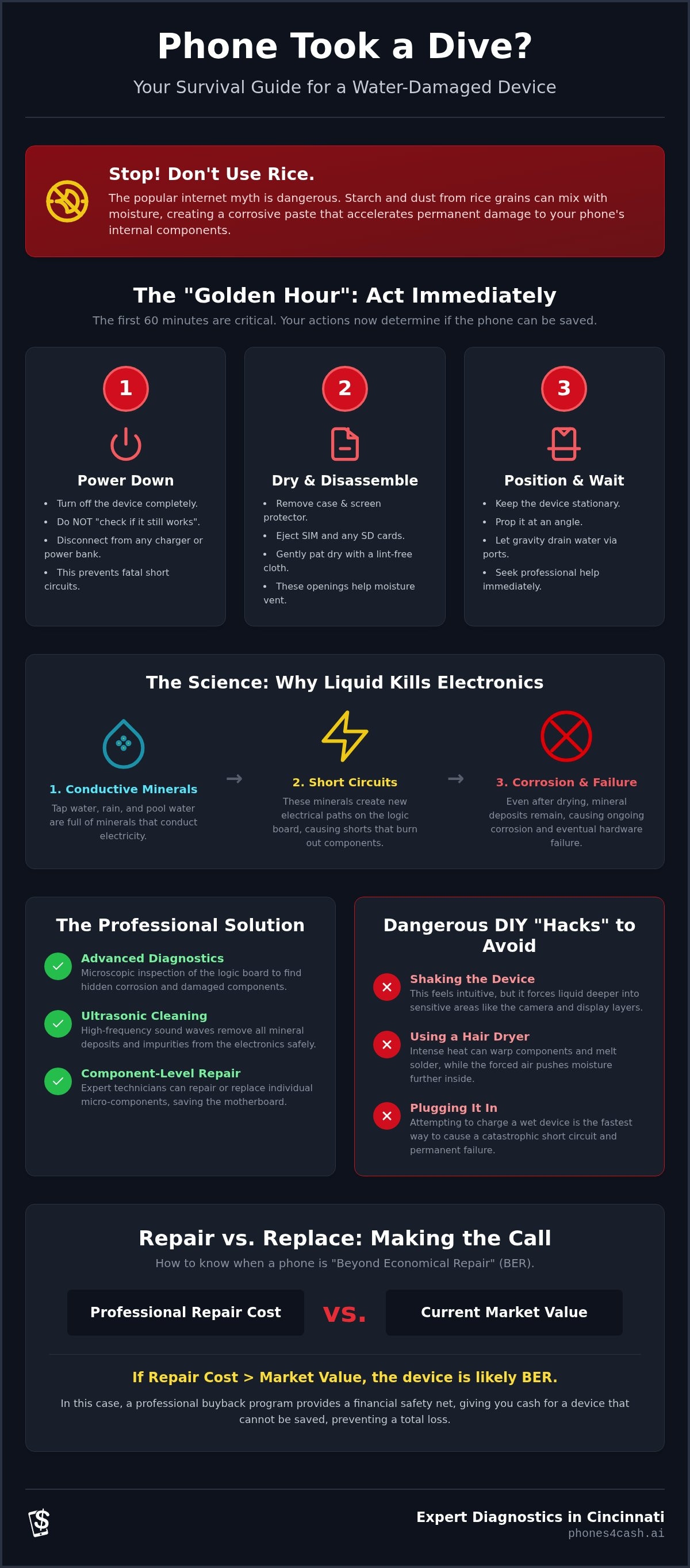
Putting your water-damaged phone in a bowl of rice is one of the most dangerous things you can do for its internal components. While it is a popular internet myth, the starch and dust from the rice often accelerate corrosion rather than stopping it. If your device just took an unexpected swim, you are likely facing an immediate fear of data loss and anxiety over high replacement costs. This is understandable, especially since liquid damage repair for smartphones is a race against time where every minute of moisture exposure counts.
We understand that you need a reliable, no-nonsense plan to get your tech back in working order. This guide outlines exactly how to stabilize your device and which common hacks to avoid to prevent permanent motherboard failure. You will learn the specific steps for a successful recovery, the logic behind professional diagnostic services, and how to identify when you need expert help in Cincinnati. If the device is eventually found to be beyond economical repair, we also explain how a professional buyback program can provide a functional financial safety net.
Key Takeaways
- Act immediately during the "Golden Hour" by powering down your device and removing all peripherals to prevent fatal short circuits.
- Identify why common DIY methods like using rice or hair dryers often accelerate corrosion and cause permanent hardware failure.
- Understand the role of professional liquid damage repair for smartphones, including advanced techniques like ultrasonic cleaning and microscopic logic board inspection.
- Learn how to determine if a device is "Beyond Economical Repair" by comparing professional restoration costs against the current market value of the phone.
- Utilize expert diagnostic services in Cincinnati to confirm internal safety or access a buyback program if the device cannot be saved.
What to Do Immediately: The Smartphone Liquid Damage 'Golden Hour'
The first sixty minutes after your device makes contact with water are known as the "Golden Hour." During this critical window, the electrochemical reactions that lead to permanent corrosion begin to take hold. Successful liquid damage repair for smartphones depends heavily on how you handle these initial moments. Your primary objective is to stop the flow of electricity and prevent moisture from migrating toward the sensitive logic board. If you act with discipline and speed, you significantly improve the odds that a technician can restore your device to full functionality.
Step 1: Immediate Power Management
Turn the device off at once. If the screen is still responsive, use the standard software shutdown procedure. If the phone is frozen or the touch screen fails, perform a hard reset by holding the specific button combination for your model until the display goes dark. Simply putting the phone into "sleep mode" is insufficient. Internal components remain energized in standby, which allows for short circuits. Resisting the urge to "check if it still works" is vital for the survival of the hardware. Every time you wake the screen or test a feature, you risk a spark that could permanently bridge circuits and burn out the motherboard.
Safety is the first priority. Never touch a wet phone if it is currently connected to a wall outlet or a portable power bank. If the device was charging when the accident occurred, turn off the power at the breaker or carefully remove the plug from the wall before touching the handset. Understanding The Science of Damage explains why this is necessary. Liquid acts as a bridge for electricity, creating unpredictable paths for current that can damage both the user and the electronics. Once the device is disconnected and powered down, it is safe to handle.
Step 2: External Drying and Component Removal
After the power is cut, focus on the exterior and removable parts. Strip away the case, screen protector, and any peripheral attachments. You must remove the SIM card tray and the SD card immediately. These small openings are not just for storage; they act as essential vents that allow trapped humidity to escape. Removing the tray also prevents the cards from being fused to the internal slot by mineral deposits.
Use a lint-free microfiber cloth to pat the exterior surfaces dry. Avoid using paper towels or napkins, as these can leave behind debris that clogs the charging port or speaker grilles. Do not shake the device. While it feels intuitive to try and "sling" the water out, this movement often forces liquid deeper into previously dry areas like the camera housing or under the display layers. Instead, follow these positioning rules to let gravity assist you:
- Keep the device stationary on a flat, stable surface.
- Prop the phone at an angle so the charging port or the largest opening faces downward.
- Do not use a vacuum or compressed air, as these can push moisture further into the chassis.
- Maintain this position until you can reach a professional for liquid damage repair for smartphones.
By keeping the device still and open, you limit the spread of the liquid. This containment makes the eventual professional cleaning process much more effective and less expensive.
The Science of Damage: Why Liquid Kills Electronics
Many users believe that simply drying a phone is enough to fix it. This is a dangerous misconception. Liquid damage is not caused by the wetness itself, but by the introduction of conductive minerals and impurities into the device. Pure, distilled water is actually a poor conductor of electricity. However, the water we encounter in daily life, such as tap water, rain, or pool water, is filled with ions that create new, unintended paths for electricity. When these paths bridge two different circuits, a short circuit occurs, often causing immediate and irreversible damage to the logic board.
Liquid travels through the chassis via capillary action. This physical phenomenon allows moisture to be pulled into the smallest gaps between integrated circuits and their metal shielding. Because these spaces are so tight, the liquid cannot evaporate on its own, even if the exterior of the phone feels dry. This hidden moisture continues to facilitate electrical shorts as long as the battery remains connected. Research into Why Liquid Kills Electronics confirms that these failure mechanisms are often microscopic, making them invisible to the naked eye but fatal to the hardware.
The Role of Minerals and Impurities
The type of liquid involved determines the speed of the hardware failure. Tap water contains chlorine and minerals that leave behind conductive deposits once the liquid evaporates. Salt water is the worst-case scenario. It is highly corrosive and causes aggressive oxidation almost instantly upon contact with copper and gold components. If your device was exposed to soda or juice, the problem is compounded by sugar. Sugar creates a sticky residue that traps heat and causes mechanical failure in buttons and charging ports. If you are unsure about the extent of internal deposits, professional diagnostic services can identify these issues before they become permanent.
Electrochemical Corrosion Explained
Corrosion is the rapid oxidation of metal components when current is present. This chemical reaction is the primary reason why liquid damage repair for smartphones is so time-sensitive. Even if a phone survives the initial splash, the corrosion process begins immediately. It acts like a slow-moving rot that eats away at the delicate solder joints and traces on the motherboard. This explains why a device might function normally for forty-eight hours before suddenly losing power or losing touch sensitivity. By the time the phone fails, the internal components are often covered in a "white powder," which is actually the physical manifestation of mineral deposits and oxidized metal. Professional liquid damage repair for smartphones focuses on removing these deposits before the metal traces are completely dissolved.
Professional Repair vs. DIY Myths: Why Rice Doesn't Work
Internet forums are filled with anecdotal success stories regarding home remedies for wet electronics. However, these hacks often cause more harm than the initial splash. Professional liquid damage repair for smartphones relies on chemistry and precision tools, not kitchen staples. Relying on myths creates a delay that allows corrosion to settle into the logic board's copper traces. If you want to save your device, you must separate fact from fiction before the internal damage becomes irreversible.
Why Rice is a Waste of Time
Rice is not a powerful desiccant. It lacks the surface area and chemical properties required to pull moisture from deep inside a sealed chassis. The real danger lies in the fine starch and dust found in every bag of rice. When this dust meets water, it forms a thick, conductive sludge that clogs charging ports, speaker grilles, and microphone holes. This residue is difficult to remove and can actually trap moisture against the motherboard, accelerating the rot you are trying to prevent.
Most importantly, rice provides a false sense of security. Users often believe the phone is safe because the exterior feels dry after twenty-four hours. This leads them to power the device on prematurely, which causes an immediate short circuit. If you have already followed these myths, consult an expert on What to Do Immediately to mitigate the secondary damage caused by improper drying techniques.
The Heat Myth: Radiators and Blow Dryers
Applying high heat is another common mistake that can lead to total hardware failure. Hairdryers and radiators can easily exceed the safe operating temperature for modern smartphones. Excessive heat can warp internal plastic components or melt the adhesive seals that provide the device's original water resistance. For devices with OLED displays, heat can cause permanent pixel discoloration or "burn-in." Additionally, thermal expansion can occur. As the air inside the phone heats up, it expands and can push liquid into previously dry compartments like the camera sensor or microphone assembly.
Vacuuming vs. Blowing
Neither vacuuming nor blowing air into the device is effective for internal moisture. A vacuum lacks the suction power to extract water from the microscopic gaps under integrated circuits. Conversely, using compressed air or your own breath simply drives the moisture deeper into the phone. While 99% isopropyl alcohol is used in professional settings, attempting a "bath" at home without full disassembly is dangerous. Alcohol can dissolve adhesives and damage the anti-reflective coatings on screens if not applied correctly. For a reliable recovery, professional liquid damage repair for smartphones is the only method that addresses the root cause of internal corrosion through controlled, technical processes.
The Professional Liquid Damage Diagnostic Process
Professional repair is a methodical, multi-step operation that treats the device with surgical precision. It begins with full disassembly. Unlike DIY attempts that focus on the exterior, technicians remove the logic board to perform a microscopic inspection. This allows them to see exactly where mineral deposits have formed and which circuits have been compromised. If they find damaged resistors or capacitors, they replace these individual components using micro-soldering techniques. This level of precision is the standard for liquid damage repair for smartphones in a professional environment.
What is an Ultrasonic Cleaner?
An ultrasonic cleaner is a specialized tank filled with a non-conductive chemical solution. The machine generates high-frequency sound waves that create millions of microscopic bubbles. When these bubbles collapse against the logic board, they strip away corrosion and mineral deposits from areas that are physically unreachable; this includes the tight spaces underneath microchips. This process is the only reliable way to stop ongoing oxidation. Simply drying a phone leaves conductive minerals behind. Cleaning the board removes the root cause of future failure and prevents the "ticking time bomb" effect where a phone dies weeks after the initial incident.
The Diagnostic Report
A transparent repair process relies on a detailed diagnostic report to define the scope of work. Technicians first check the Liquid Contact Indicators (LCI). These small stickers turn red when exposed to moisture, providing physical proof of the breach. Next, they use a DC power supply to test the device's power draw. If a phone has a shorted rail, it will pull an abnormal amount of current. This data helps the technician determine a realistic success rate. We provide these professional diagnostic services to ensure you understand the condition of your hardware before you commit to the cost of replacement parts.
The final stage of the process involves reassembly and rigorous testing. Technicians must verify that sensitive sensors like FaceID, TouchID, and the proximity sensor still function correctly. These components are often the first to fail after a splash because they are located near the edges of the chassis. If the repair is successful, the device is returned with a clear summary of the work performed. If the damage is too extensive for a reliable fix, the diagnostic report serves as the basis for deciding your next steps. This structured approach ensures that liquid damage repair for smartphones is a predictable and logical journey rather than a series of guesses.
Repair vs. Replacement: Making the Call in Cincinnati
Deciding whether to proceed with liquid damage repair for smartphones often comes down to a simple financial calculation. You must compare the estimated repair cost against the current resale value of your specific model. In 2026, the right to repair movement has made parts more accessible, yet the complexity of OLED panels and integrated sensors means some repairs remain high-cost. If the internal corrosion has reached a point where the device is designated as Beyond Economical Repair (BER), investing in a fix may not provide long-term reliability. However, even if the hardware is considered BER, professional data recovery services can often still retrieve your photos and contacts before the device is retired.
Local Repair Services in Cincinnati and Mason
For residents in Cincinnati, Mason, and Fairfield, local intervention is the most effective way to avoid a total loss. Mail-in services often involve a three to five-day delay, which is far too long for a moisture-compromised motherboard to wait. Every hour that liquid remains inside the chassis increases the risk of permanent traces dissolving. Phones4cash LLC offers walk-in diagnostic services in the Cincinnati area to provide immediate assessments. Our technicians in Fairfield and Westchester can perform the necessary disassembly and ultrasonic cleaning during that vital window when the success rate is at its highest. This proximity allows us to address the issue before the mineral deposits harden and cause permanent failure.
The Buyback Alternative
If the diagnostic report shows that your device cannot be safely restored, you still have options to recoup value. We provide a functional safety net through our smartphone buyback program. We purchase liquid-damaged devices for parts or refurbishment, allowing you to turn a broken handset into immediate credit. This credit can be applied toward our inventory of certified refurbished iPhones and Samsung phones, ensuring you stay connected without the full expense of a brand-new retail unit. This transparent approach ensures you never walk away with a total financial loss. Since 68% of consumers report delaying repairs due to cost concerns, having a guaranteed buyback value provides the peace of mind needed to make an informed decision. Whether you choose to repair or trade in, our goal is to provide a predictable outcome that protects your investment in technology.
Visit our Cincinnati location for a professional diagnostic or buyback quote.
Secure Your Device's Future Today
Liquid damage doesn't have to result in a total loss if you act with discipline and speed. By prioritizing the "Golden Hour" and avoiding common DIY traps like rice or excessive heat, you give your hardware the best possible chance at a successful recovery. Effective liquid damage repair for smartphones requires more than just surface drying; it demands professional intervention to remove conductive minerals before they permanently dissolve internal circuits. Our expert technicians in Mason and Fairfield provide the specialized tools and transparent diagnostic reports needed to assess the true condition of your phone.
If the device is found to be fixable, we use advanced ultrasonic cleaning to stop ongoing corrosion in its tracks. If the damage is beyond economical repair, we provide immediate cash offers for your damaged device to help you transition into a certified refurbished replacement. Don't leave your data and hardware to chance by relying on internet myths. Get a Professional Liquid Damage Diagnostic in Cincinnati and take the first step toward a predictable and reliable recovery. Your device deserves a professional assessment to ensure its long-term functionality remains intact.
Frequently Asked Questions
Is a water-damaged phone fixable?
Yes, most water-damaged devices can be repaired if the internal corrosion hasn't dissolved critical motherboard traces. Success depends on the type of liquid involved and how quickly you removed the power source. If you address the issue during the "Golden Hour," a technician can usually stabilize the hardware. However, if the logic board has suffered extensive short circuits, the device may be designated as beyond economical repair.
How much does liquid damage repair for smartphones cost?
The total investment for liquid damage repair for smartphones depends entirely on the diagnostic findings and the specific components that require replacement. A simple ultrasonic cleaning is less expensive than a full logic board repair involving micro-soldering. If the screen or battery also requires replacement due to moisture intrusion, these costs are added to the labor. A professional diagnostic is the only way to get an accurate quote.
Does putting a phone in rice really work?
No, rice is an ineffective desiccant that often causes more harm than good. It doesn't have the chemical properties to pull moisture out of a sealed device. Instead, the starch and dust from the rice create a conductive sludge that accelerates corrosion on the motherboard. You're better off leaving the phone in open air with a fan or using silica gel packets in a sealed container.
Will my warranty cover liquid damage?
Standard manufacturer warranties almost never cover liquid damage, even if the phone is marketed as water-resistant. Most modern devices contain internal Liquid Contact Indicators that change color when moisture is detected. Once these stickers turn red, the warranty is voided. You'll likely need to rely on third-party insurance or pay for out-of-warranty professional services to get the device back in working order.
How long does a professional liquid damage repair take?
The timeline for professional liquid damage repair for smartphones usually ranges from one to three business days. This duration allows for a full disassembly, a complete ultrasonic cleaning cycle, and a 24-hour testing period. Rushing the process is risky because moisture can remain trapped under integrated circuits. Technicians need this time to ensure the device is stable and that all sensors are functioning correctly before reassembly.
Can you recover data from a phone that won't turn on after getting wet?
Yes, data recovery is often possible even when the handset itself is considered unfixable. Technicians can perform "board-level" repairs to temporarily stabilize the logic board and create a data bridge. This allows them to extract your photos, contacts, and messages to a secure drive. Even if the screen is dead or the battery won't charge, the memory chip often remains intact and accessible to experts.
What are the signs of internal corrosion in a smartphone?
Common signs of corrosion include a flickering display, non-responsive touch areas, or a camera lens that looks foggy from the inside. You might also notice the device getting unusually hot or the battery percentage dropping rapidly even when the phone isn't in use. If you see white or green crusty residue inside the charging port, it's a clear indicator that mineral deposits are already forming on the internal hardware.
Is it safe to use a phone after it has been dried out?
It's only safe to use the phone after a professional diagnostic confirms that all mineral deposits have been removed. A phone that "works" after drying out can still have trapped moisture that causes a fatal short circuit weeks later. Without a proper internal cleaning, the corrosion process continues silently in the background. It's a ticking time bomb that can lead to sudden power failure or data loss at any moment.


